
Chrome does not keep your tabs one per process. It keeps them in renderer processes, and one renderer process can be serving several tabs at once. Google's own troubleshooting page says so in passing: a --type=renderer process is "one or more tabs or extensions that are currently in use".
That "or more" is the whole answer to this question. Memory returns to your operating system when a process exits, and closing a tab only ends a process when that tab was the last thing living in it.
Does closing a tab free RAM?
Yes, when the tab you closed was the last live view in its renderer process. Chrome shuts the process down and the operating system takes back every page it was holding. If any other tab is still using that same process, the process keeps running and the pile of memory you were looking at stays roughly where it was.
Chromium is blunt about this, in a function whose name is the entire design: FastShutdownIfPossible. The first thing it checks is whether anything else is still using the process, and the comment above the check reads "Do not shut down the process if there are active or pending views other than the ones we're shutting down." If there are, the function returns false and the process lives on.
This is why closing tabs one at a time so often feels like it accomplishes nothing. The tabs that pile up are the ones that came from each other - eleven Jira tickets, six Google Docs, a chain of Stack Overflow questions - and those are exactly the tabs most likely to be sharing a process. Closing them individually walks a process down towards empty without ever reaching it.
Why do several tabs share one Chrome process?
Because Chrome will not create renderer processes without limit, and the ceiling is calculated from how much RAM is in the machine. Under the ceiling, Chrome gives a site its own process. Over it, Chrome starts folding new tabs into processes it already has.
The arithmetic lives in render_process_host_impl.cc and it is two lines long: take the physical memory the OS reports, halve it, and divide by an assumed cost per tab. That assumed cost is a constant named kEstimatedWebContentsMemoryUsage, and on a 64-bit machine it is 85 MB.
The file's own comment tabulates what falls out:
| Installed RAM | Renderer processes the arithmetic allows |
|---|---|
| 512 MB | 3 |
| 1 GB | 6 |
| 4 GB | 24 |
| 16 GB | 96 |
Two clamps then apply. The floor is three processes. The ceiling is half of whatever process limit the operating system itself imposes, and when Chrome cannot read one it falls back to a hardcoded 82.
Chrome goes past that number rather than refusing to open the tab, and Chromium's process-model documentation is specific about what it does instead. Its worked example: with a limit of 100 processes and 50 tabs open on example.com, a new example.com tab "will share a process with a random existing example.com tab". Random. There is no rule you can learn that predicts which of your open tabs the next one moves in with.
Below the limit the behaviour is easier to reason about, and it decides which of your tabs are joined at the hip. Chromium groups tabs that can reach each other - a tab opened from another tab keeps a reference back to its opener - and calls that a browsing context group. Same-site documents inside one browsing context group must share a process, because they can script each other synchronously and splitting them would produce data races. Two tabs you opened independently on the same site are separate instances that never need that access, and can safely run apart.
There is a second sharing rule that has nothing to do with your tabs at all. A cross-site iframe is dropped into an existing process for its own site wherever one exists, before the limit is anywhere in sight. The embedded map, the embedded video and the third-party comment widget spread across four different pages are one process between them, and closing any one of those pages does not end it.
What keeps a Chrome process alive after you close its tab?
Six things, and only one of them is other tabs.

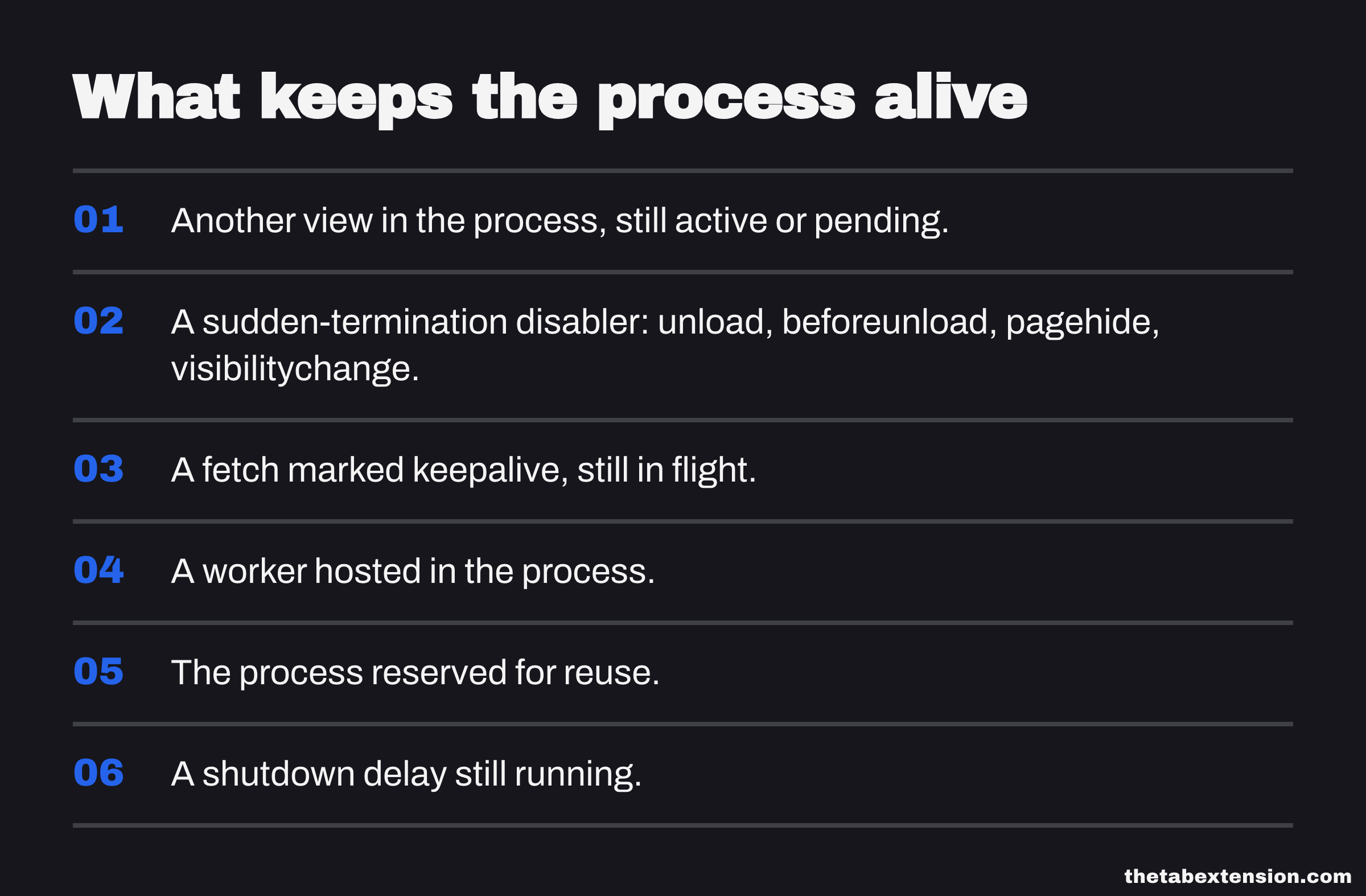
Chrome's fast path at tab close is to kill the renderer outright without asking it to wind down first. FastShutdownIfPossible refuses that path if any of six conditions holds: another view in the process is still active or pending, the page registered a sudden-termination disabler, a fetch marked keepalive is still in flight, the process is hosting a worker, the process is reserved for reuse, or a shutdown delay is running. The same six reappear in Cleanup, the slower path that eventually deletes the process host.
Only the first of them holds the process for as long as you leave the other tabs open. The remaining five are delays. The tab closes, the handlers get their moment, the process exits shortly after. "Chrome kept the process" and "Chrome took an extra second to exit it" are different complaints, and only one of them is a problem.
The sudden-termination disabler is the interesting entry, because of how ordinary it is. In Blink, exactly four events register one, and they are listed in a single function called IsSuddenTerminationDisablerEvent: unload, beforeunload, pagehide, and visibilitychange.
That last one is not an exotic API. visibilitychange is how a page finds out you tabbed away, which is the hook analytics uses to close out a session and a video player uses to pause itself. A page listening for it is a page Chrome is not allowed to fast-kill.
Workers are the quieter case. Chromium generally places a site's service worker in the same process as a document likely to rely on it, and a process with a live worker in it does not exit when you close the tab that introduced you to it.
Why does the memory still look used afterwards?
Because "free" is not a state your operating system is trying to reach. Both Windows and macOS keep a page in RAM long after the process that owned it has gone, and both report that page as something other than available.
Windows calls it a transition page. Microsoft's documentation on working sets sets out the lifecycle plainly: once a page has been removed from the working sets of every process that was using it, "Transition pages remain cached in RAM until the page is either referenced again by some process or repurposed". The memory is genuinely reusable. It is not counted as free, and Task Manager files it under cached rather than showing you the drop you were waiting for.
macOS is more emphatic still. Activity Monitor splits memory into App Memory, Wired Memory, Compressed and Cached Files, where Cached Files is "the size of files cached by the system into unused memory to improve performance". Apple's own guidance on whether a Mac needs more RAM tells you to read the Memory Pressure graph rather than the used figure, and puts the reason in one sentence: "When you have free or unused memory, your computer performance does not necessarily improve."

Chrome adds a small contribution of its own. It keeps a pre-warmed, empty renderer on hand so the next navigation does not have to pay for a process launch, and the class managing it describes its own cost as "pre-warmed renderer processes (tens of MBs each)". Close a tab, watch the Chrome process count in your system monitor, and the number you expected to fall by one may hold steady because a spare stepped into the gap.
So what actually gives the memory back?
Three things do, in ascending order of how much they return and how much you have to give up for it.
Close every tab of one site rather than one tab of five. This is the small change that turns nothing into something. Chrome frees at process granularity, so the last tab of a site is the one that pays out and the four before it were bookkeeping. If Jira is what is eating the machine, close all eleven Jira tabs; closing three of them accomplishes very little.
Close the window. Every process backing it goes at once, and this is the version of the advice that holds regardless of which tabs turned out to share what.
Save the whole set somewhere and close all of it. This is the only one of the three that does not cost you the tabs. The memory comes back in full and immediately, because the processes are gone rather than parked, with no eligibility list and no timer standing between you and the reclaim.
Saving the open set in one action and closing it is the workflow TheTab is built around, and the archive it leaves behind is dated and searchable. The property that matters is the one-click save rather than our version of it - the four kinds of tab manager covers the whole field, and anything with that property does the same job here.
Chrome's own lever works on a completely different timescale. Memory Saver discards background tabs without closing them, which returns the memory while leaving the tab strip intact, but only after two to six hours in the background and only for tabs that clear its eligibility list. The full Memory Saver guide covers the settings path and how to read the per-tab figures in Chrome's own Task Manager, which is the tool to reach for when you want to know what any of this costs on your machine rather than in the abstract. And if the conclusion you are heading towards is that a different browser would handle a hundred tabs better, that comparison is its own article.
What to expect when you close a tab
Closing tabs frees memory. It frees it in process-sized units, which is why the results feel so arbitrary: one close returns several hundred megabytes, the next ten return nothing, and from outside the browser those two look identical.
So close a whole site's worth at a time. Expect the operating system to keep the pages as cache instead of handing them back as free, and read memory pressure rather than the used figure if you want to know whether any of it made a difference. A tab is not a unit of memory. A process is.
SOURCES
Every factual claim in this article traces to a source below. Where we could not source a claim, we removed it rather than softening it.
Read 20 August 2026 from the main branch. Full Site Isolation (site-per-process) is the mode used on Windows, Mac, Linux and ChromeOS. Any two documents with the same principal in the same browsing context group must live in the same process, because they have synchronous access to each other's content; separate instances of the same site in unrelated tabs do not need that access and can safely run in separate processes. The Soft Process Limit bullet states that desktop Chromium sets a soft process limit based on the memory available on the client, that it starts randomly reusing same-site processes when over the limit, and gives the worked example of a 100-process limit where a new example.com tab shares a process with a random existing example.com tab. The Aggressive Reuse bullet states that out-of-process iframes and fenced frames are placed in an existing same-site process even before the limit is reached, and that ServiceWorkers are generally placed in the same process as a document that is likely to rely on them.
Read 20 August 2026 from the main branch. GetMaxRendererProcessCount halves the installed physical memory reported by the OS and divides it by kEstimatedWebContentsMemoryUsage, which is 85 MB on a 64-bit CPU and 60 MB on 32-bit; the function's own comment tabulates the result as 512 MB to 3, 1024 MB to 6, 4096 MB to 24 and 16384 MB to 96 processes. The result is clamped between kMinRendererProcessCount, which is 3, and GetPlatformMaxRendererProcessCount, which is half the operating system's process limit and falls back to a constant 82 when that limit cannot be read. FastShutdownIfPossible refuses to terminate the process when other views are active or pending ("Do not shut down the process if there are active or pending views other than the ones we're shutting down"), when the page has registered a sudden-termination disabler, when keep_alive_ref_count_, worker_ref_count_, pending_reuse_ref_count_ or shutdown_delay_ref_count_ is non-zero. Cleanup holds the process host open for the same set of reasons plus remaining listeners.
Read 20 August 2026 from the main branch. IsSuddenTerminationDisablerEvent returns true for exactly four event types: unload, beforeunload, pagehide and visibilitychange. AddedEventListener registers a sudden-termination disabler with the frame whenever a listener for one of those four is added to the window, and RemovedEventListener clears it again.
Read 20 August 2026 from the main branch. The memory-consumer traits declared for the spare renderer manager describe it as pooling "pre-warmed renderer processes (tens of MBs each)", note that process termination lets the OS reclaim memory pages directly, and record that launching a replacement renderer process is expensive.
Read 20 August 2026 from the main branch. GetTimeBeforeDiscardForCurrentMode returns 6 hours for kConservative, 4 hours for kMedium and 2 hours for kAggressive, which is the two-to-six-hour range this article attributes to Memory Saver. The policy's unit test fixes the same three constants independently.
Read 20 August 2026, and dated with that read date because Google revises this page in place. It describes a Chrome process started with --type=renderer as "one or more tabs or extensions that are currently in use", which is Google's own statement that a renderer process is not one tab.
After a page has been removed from the working sets of all processes that were using it, the page becomes a transition page, and "Transition pages remain cached in RAM until the page is either referenced again by some process or repurposed (for example, filled with zeros and given to another process)."
Read 20 August 2026. The Memory pane separates Memory Used into App Memory, Wired Memory and Compressed, and lists Cached Files separately as "the size of files cached by the system into unused memory to improve performance". Memory Pressure "graphically represents how efficiently your memory is serving your processing needs".
Read 20 August 2026. Apple instructs readers to judge memory by the Memory Pressure graph, green meaning RAM is being used efficiently, and states that "When you have free or unused memory, your computer performance does not necessarily improve."