
Your browser choice changes how much tab chaos you can absorb before you need help, and not much more than that. All eight browsers below will let you open two hundred tabs and then get slow about it. What differs is how much structure each one hands you first: whether you can group tabs, stack them, stand them on their side, put them to sleep, or save a whole set and get it back next week.
This is a comparison of those features, checked against each vendor's own documentation and release notes in August 2026. It is not a benchmark.
Which browser uses the least RAM at 100 tabs?
There is no trustworthy public answer to that question, and this article is not going to invent one. An earlier version of this piece claimed we had tested six browsers at 50, 100 and 200 tabs and listed eighteen RAM figures to one decimal place. We had not. Those numbers have been deleted rather than adjusted, and nothing has replaced them.
The deeper problem is that the measurement barely means anything even when someone does perform it. Memory used at a given tab count depends on which pages are in those tabs, how long they have been sitting there, whether the browser has already unloaded some of them, how much physical RAM the machine has, and what the rest of the operating system is doing. Chromium is designed to use more memory when memory is available and release it when it is not, so the same browser on the same laptop with the same tab count will report different figures on two consecutive runs.
Search for browser RAM benchmarks and you will find a great many pages confidently reporting one-decimal numbers for Firefox at 50 tabs. Almost none of them publish a hardware spec, a browser version, a page set, or a command you could re-run. Treat those the way you should have treated ours.
The thing that cuts memory at high tab counts is not which browser you picked. It is unloading the tabs you are not using, which every browser here now does under one name or another, and closing the tabs you are never going back to, which none of them will do for you. Chrome's version is called Memory Saver; what it does, what it costs you, and why it disappoints people who expected more is its own article.
Which browsers have native tab groups and vertical tabs?
Nearly all of them, as of 2026. This was the real dividing line between browsers three years ago and it has almost completely closed. Chrome was the last mainstream holdout on vertical tabs and shipped them in April 2026.
| Browser | Tab groups | Vertical tabs | Sleep / unload | Saved sessions | Split view |
|---|---|---|---|---|---|
| Chrome | Yes, synced across devices | Yes, April 2026 | Memory Saver | Extension needed | Yes, February 2026 |
| Firefox | Yes, since 137 | Yes, since 136 | Tab unloading | Extension needed | Yes, since 149 |
| Edge | Yes | Yes | Sleeping tabs | Workspaces, personal only | Yes |
| Vivaldi | Tab Stacks, two-level | Yes | Hibernation | Built in | Tab Tiling |
| Brave | Yes | Yes, since 1.52 | Inherited from Chromium | Extension needed | Yes |
| Opera | Tab Islands | Yes | Inherited from Chromium | Workspaces | Yes |
| Safari | Yes, since 2021 | Sidebar only | Handled by macOS | Extension needed | No |
| Zen | Workspaces | Yes, by default | Inherited from Firefox | Workspaces persist | Yes, up to four |
Saved sessions is the one nearly nobody has, and it is the feature people actually mean when they say their browser is bad at tabs. Split view went the other way in 2026: Chrome added it in February and Firefox in March, so a column that used to tell browsers apart now singles out Safari and nothing else.
Vivaldi has more tab machinery than anything else
Vivaldi is the only browser here where a heavy tab workflow works with no extensions at all, and it is not close.
Tab Stacks group tabs by dragging one onto another, and they stack two levels deep, so the top row holds the stacks and a second row holds the tabs inside the active one. Accordion tabs expand and collapse a stack with one click. Tab Tiling puts several tabs on screen at once, and Vivaldi 7.8 on 29 January 2026 made the layout itself draggable: pull one or more tabs from the tab bar into the main content window, hover to pick the arrangement, then rearrange tiles, resize them or drag in more tabs while you work. Right-clicking a link opens it straight into a tile.
Underneath that sit the boring features that matter more day to day. Saved Sessions is built in, which means Vivaldi is the one browser in this comparison that can do the save-everything-and-close-it move without an extension. Tab Hibernation suspends background tabs or a whole stack from the right-click menu. There are also Workspaces for project separation, a periodic reloader, scrollable two-level tab bars, tree-style tabs via the Window Panel, and tab search through Quick Commands.
The cost is real and it is not performance. It is that Vivaldi asks you to configure a browser before you can use it well, and a new user staring at that settings page usually retreats. Vivaldi also has a small enough share that some sites and enterprise tools have simply never been tested against it.
Microsoft Edge has the features and keeps removing them
Edge still has the strongest out-of-the-box tab story of the mainstream Chromium browsers: vertical tabs, tab groups, sleeping tabs on a timeout you pick yourself, split screen, and Workspaces. All of those are live in 2026.
What changed in 2026 is that Microsoft deleted Collections, the feature Edge users had been filing research into for six years. Retirement began in Edge 147 on 10 April 2026, when a banner appeared and users could no longer add new items. Collections was removed outright in Edge 149 on 4 June 2026, with Microsoft's own release note telling users to export their content or move the pages to Favorites before updating. Anyone who jumped straight to 149 without reading a release note lost the lot.
Workspaces survived, but not intact. Starting with Edge 145 in February 2026, Microsoft migrated Workspaces to a "V2" architecture: saved workspace data moved off OneDrive and onto the Edge Sync service, and the sharing and collaboration functionality was removed. Workspaces is now a personal feature.
Sleeping tabs and vertical tabs are good and worth turning on. But a browser-native place to store research is a place your vendor can delete on a release schedule, and Microsoft has just demonstrated exactly what that looks like. Keep the research somewhere you can export.
Firefox got tab groups and vertical tabs in 2025
Firefox has both native tab groups and native vertical tabs, and it got them in consecutive releases.
Vertical tabs shipped in Firefox 136 on 4 March 2025, moving open and pinned tabs into the sidebar. Tab groups began rolling out in Firefox 137 on 1 April 2025 - drag one tab onto another, name the group, colour it, and it is saved. The rollout was staged, which is part of why the feature took a while to register with people. Split View followed in Firefox 149 on 24 March 2026: select one or two tabs, choose Add to Split View or Open in Split View, and two pages sit side by side in one window.
Two older Firefox features still have no equivalent elsewhere. Container Tabs isolate cookies and logins per tab, so a work Google account and a personal one can be signed in at once in the same window. Safari Profiles and Edge Workspaces get at a similar idea, but they separate whole windows rather than individual tabs, which is a coarser tool. Tab unloading has been in Firefox since version 93 in October 2021: when system memory runs critically low, Firefox unloads the heaviest tabs you have not touched, keeps them in the tab strip, and restores scroll position and form data when you click back. about:unloads shows you the queue. One caveat the feature is usually described without: it only runs on its own on Windows. The preferences that gate it ship with automatic unloading off on Linux, and off on macOS outside Nightly builds, which is one of several things covered in the Firefox deep-dive.
There is a third reason a lot of people are on Firefox in 2026 and it is not a tab feature at all. Firefox is where the full uBlock Origin still runs. That is covered in more detail in the productivity extensions roundup.
Chrome finally shipped vertical tabs in April 2026
Chrome is still the default for most of the web - Statcounter put it at 68.22% worldwide in July 2026, with Safari second at 16.47% and Edge third at 5.37%.
On 7 April 2026 Google announced vertical tabs and a full-page reading mode. You turn vertical tabs on by right-clicking a Chrome window and choosing "Show Tabs Vertically", and they stay on until you switch back. Google's framing was that the sidebar lets you "read full page titles and manage tab groups with ease - even when your tab count hits double digits".
Chrome also got split view that year, announced on 19 February 2026 as a way to view two tabs at once in a single window. Chrome's own documentation gives it a keyboard shortcut, Shift+Alt+N on Windows and Linux, and a drag-a-tab-to-the-window-edge gesture.
Chrome's other tab features are older. Tab Groups are saved and synced across devices where you are signed in with the same Google Account, so a group made on a laptop shows up on a phone. Memory Saver shipped in Chrome 110 in February 2023, after Google announced it on 8 December 2022 claiming up to 40% and 10GB less memory in use; it frees memory from inactive tabs and reloads them when you return, at the cost of a visible pause on the way back.
The gap in Chrome is the same gap it has always had. A Chrome tab group syncs for exactly as long as you keep it, and Chrome has no native way to take everything currently open, put it somewhere searchable, and close it.
One more thing about Chrome shapes what you can pair it with: Manifest V2 is gone. Google's own deprecation timeline has MV2 extensions disabled for all users as of Chrome 138, ceasing to function entirely from Chrome 139, with even the leftover installs unable to update from August 2026.
Do not start using Arc in 2026
Arc is in maintenance and has been for over a year, and the company said so itself. On 26 May 2025 CEO Josh Miller wrote to Arc members that The Browser Company is "not actively developing the core product experience like we used to", and that for most people Arc had been "simply too different, with too many new things to learn, for too little reward". Atlassian announced an agreement to acquire the company on 4 September 2025 and completed the acquisition on 21 October 2025. The team now works on Dia, an AI browser that shares almost nothing with Arc's design.
Arc still downloads, still runs on macOS and Windows, and still receives Chromium engine upgrades and security patches. It receives nothing else. There is no roadmap and there is also no announced sunset date, which is a worse position than either a healthy product or a scheduled shutdown, because you cannot plan against it.
An earlier version of this article recommended Arc to minimalists on the strength of its auto-archive philosophy. That recommendation is withdrawn. The philosophy was genuinely good - Spaces separated projects properly, tabs auto-archived after twelve hours by default so hoarding was structurally difficult, and the sidebar-first layout influenced everything that came after it. If you are already on Arc and happy, there is no emergency and no reason to churn this week. But do not migrate a workflow onto it now.
Brave, Opera, Safari and Zen, briefly
Brave
Chromium's tab feature set plus vertical tabs, which Brave shipped in version 1.52 on 31 May 2023, several years ahead of Chrome. Tab groups work the same as Chrome's.
Brave's real draw is content blocking. It is the only Chromium browser where the full uBlock Origin still runs: Brave hosts four Manifest V2 extensions on its own backend - AdGuard, NoScript, uBlock Origin and uMatrix - and they install from brave://settings/extensions/v2, not the Chrome Web Store.
Opera
Tab Islands group tabs automatically by context, so you never file anything yourself, which is a genuinely different idea from every other tab group implementation here. Opera One R3 in January 2026 added names and colours to Islands. Workspaces, split screen and vertical tabs are all present.
Safari
Tab Groups arrived with macOS Monterey in October 2021 and sync across Mac, iPhone and iPad. Profiles arrived with macOS Sonoma in September 2023, and each profile carries its own Tab Groups, extensions, history and cookies, which covers most of what Firefox Containers do at a coarser grain. Safari's sidebar is as close as it gets to true vertical tabs. It has the fewest knobs here and asks the least of you, which for a lot of people is the correct trade.
Zen
Firefox-based and Arc-shaped: a vertical sidebar, workspaces instead of windows, Compact Mode to hide every toolbar, and Split View that tiles up to four tabs horizontally, vertically or into a grid. It is the closest live equivalent to what Arc was, and it is actively developed: stable builds land every few weeks, and the August 2026 ones track the Firefox 153 engine.
Zen is a volunteer open-source project rather than a funded company. Whether that reads as reassuring or worrying depends entirely on what you think went wrong with Arc.
Which one should you actually pick?
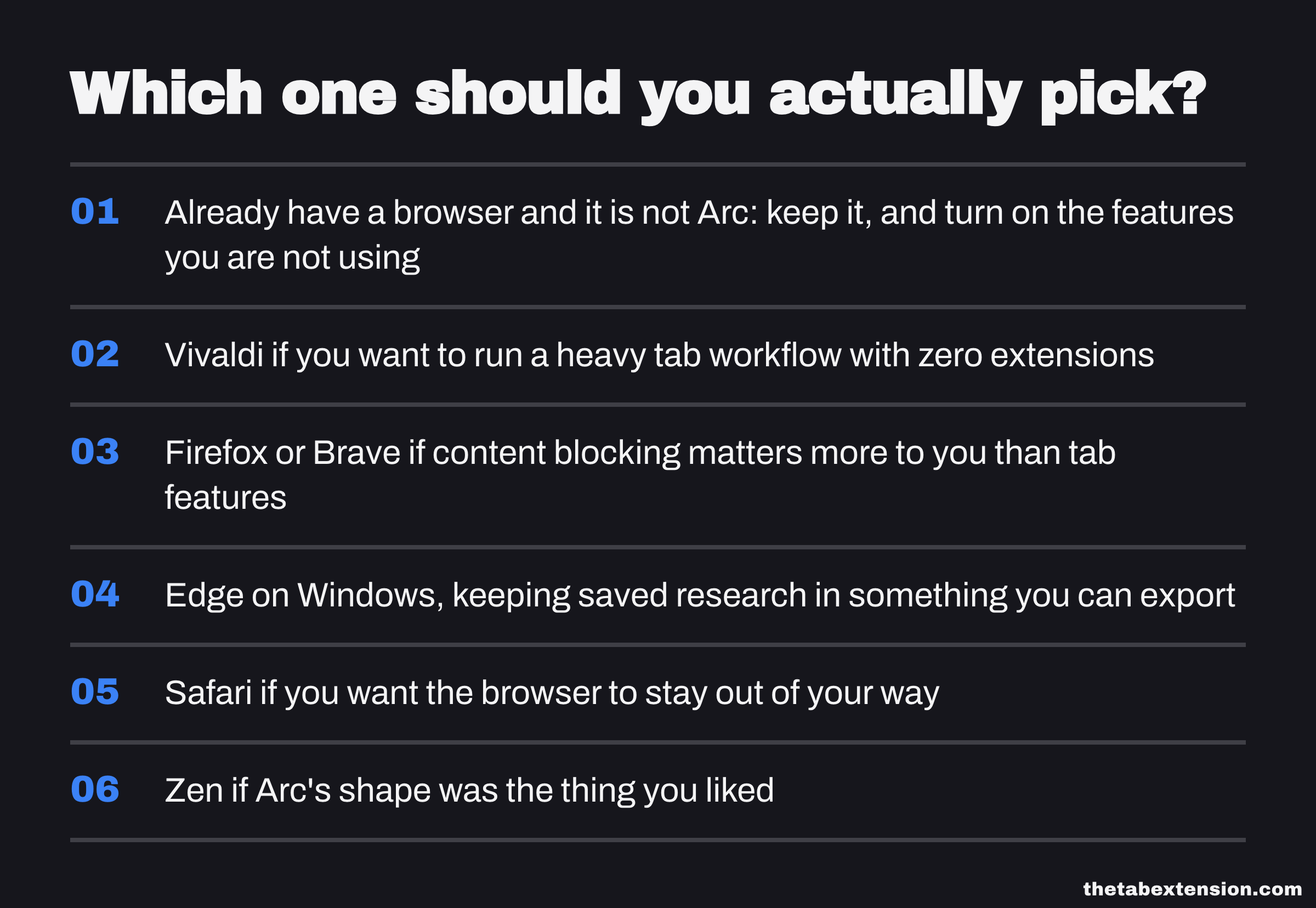
If you already have a browser and it is not Arc, keep it and turn on the features you are not using. Vertical tabs and tab sleeping now exist nearly everywhere, and switching browsers costs you more than the feature gap is worth.
Past that: Vivaldi if you want to run a heavy tab workflow with zero extensions and you enjoy configuring software. Firefox or Brave if content blocking matters more to you than tab features, because those are the two browsers where full uBlock Origin still works. Edge on Windows, with the caveat that saved research belongs in something you can export. Safari if you want the browser to stay out of your way. Zen if Arc's shape was the thing you liked.
Where the browser stops and an extension starts
Every browser above can group tabs. None of them except Vivaldi can do the thing people actually want at ninety open tabs, which is: make all of this go away right now, and give it back next Tuesday if it turns out I needed it. Tab groups organise what is open. They do not archive it, and a group you never collapse is just a tab bar with colours on it.

That gap is what tab manager extensions exist to fill, and what a tab manager actually is covers the four quite different kinds before you pick one. If you want a system to put around whichever browser you land on, there are seven tab organisation methods worth testing.
TheTab is our own extension, so weigh this paragraph accordingly. It saves every open tab in one click, closes them, keeps the archive searchable and organised by date, and exports to a file you can read. It runs on Chrome, Edge and Firefox, and the archive stays in local browser storage. There is no TheTab account and no TheTab server; two default-on backups mirror recent groups into your browser's own sync storage and into a bookmarks folder, both switchable off. That is recovery after a reinstall, not cross-device workflow - if you need your whole archive on a second machine, TheTab will not give you that, and Toby or Workona will. The OneTab alternatives roundup covers the whole field, including the cases where the right answer is something other than ours.
SOURCES
Every factual claim in this article traces to a source below. Where we could not source a claim, we removed it rather than softening it.
Firefox shipped native vertical tabs and the updated sidebar in version 136.
Firefox began rolling out native tab groups in version 137.
Firefox 149, first offered to Release channel users on 24 March 2026, added Split View for viewing two pages side by side in a single window, started from Add to Split View or Open in Split View.
Firefox unloads memory-heavy inactive tabs under low memory since version 93, with about:unloads exposing the queue.
Read 23 August 2026 from mozilla-central tip. browser.tabs.unloadOnLowMemory is true under XP_MACOSX or XP_WIN and false otherwise, so Linux ships with automatic tab unloading off. browser.lowMemoryResponseMask, which gates the whole macOS low-memory response including the tab unloader, is 3 under NIGHTLY_BUILD and 0 otherwise, and 0x0 is documented in the same file as "No response (other than recording for telemetry, crash reporting)".
Chrome shipped native vertical tabs on 7 April 2026, enabled by right-clicking a window and choosing Show Tabs Vertically.
Google announced Chrome split view on 19 February 2026, describing it as letting you view two tabs at the same time in one window.
Chrome's split view documentation covers showing two sites side by side in one window, and gives the keyboard shortcut Shift+Alt+N on Windows and Linux.
Chrome automatically saves and syncs tab group changes across devices where you are signed in with the same Google Account.
Memory Saver frees memory from inactive tabs, announced with a claim of up to 40% and 10GB less memory in use.
Chrome held 68.22% of worldwide browser share in July 2026, ahead of Safari at 16.47% and Edge at 5.37%.
Collections retirement began in Edge 147 and the feature was removed in Edge 149; Workspaces migrated to a V2 architecture from Edge 145 with sharing and collaboration removed.
Edge puts background tabs to sleep after two hours of inactivity by default, and the interval is user-selectable under Settings, System and performance, Performance.
Atlassian announced on 4 September 2025 that it had entered into an agreement to acquire The Browser Company, the team behind the Dia and Arc browsers.
The acquisition closed on 21 October 2025.
Josh Miller wrote on 26 May 2025 that The Browser Company is "not actively developing the core product experience like we used to" on Arc, that it never stopped maintaining it with regular Chromium upgrades and security fixes, and that for most people Arc was "simply too different, with too many new things to learn, for too little reward".
Brave hosts AdGuard, NoScript, uBlock Origin and uMatrix as Manifest V2 extensions on its own backend at brave://settings/extensions/v2.
Brave made the vertical tabs setting available to Windows, macOS and Linux users with the 1.52 desktop release on 31 May 2023.
Vivaldi ships two-level Tab Stacks, accordion tabs, Tab Tiling, hibernation, Saved Sessions, tab cycling and tab search natively.
Vivaldi 7.8 made tiled layouts draggable - "Creating tiled layouts is now as simple as dragging a tab (or multiple) from the Tab Bar into the main content window" - with tiles that can be rearranged and resized on the fly, and an Open Link as Tiled Tab option.
Opera One R3 added names and colours to Tab Islands.
Opera One offers vertical tabs.
Safari Tab Groups shipped with macOS Monterey in October 2021, and "Tab Groups sync across Mac, iPhone, and iPad". The release names no Safari version number.
Safari profiles shipped with macOS Sonoma in September 2023 and "keep browsing separate between topics like work, school, and more". The release names no Safari version number.
Safari Profiles keep separate Tab Groups, extensions, history and cookies per profile.
Google's deprecation timeline states MV2 extensions are disabled for all users on all channels as of Chrome 138, cease to function from Chrome 139, and that MV2 extensions installed on Chrome 138 or earlier can no longer receive updates from August 2026.
Zen organises tabs into workspaces, described as bringing "the flexibility of multiple browser windows into one streamlined experience", each able to carry a default container tab.
Zen's Compact Mode "lets you hide all browser toolbars and gives a wider view of the website you're currently visiting", with hidden bars reappearing on hover.
Zen's Split View "lets you view up to 4 tabs side by side", with horizontal, vertical and grid layouts.
Zen ships stable builds every few weeks; the 1.21.14b release notes dated 11 August 2026 record "Update Firefox version to 153.0.4".