
Search for a tab manager and you land on the same two names: Toby and OneTab. They get compared constantly, which is odd, because they are not really the same category of tool. Picking between them by feature count will lead you wrong. Picking between them by what they assume about your work will not.
What is the actual difference between Toby and OneTab?
OneTab is a pressure release valve. Toby is a workspace. OneTab collapses whatever you have open into a timestamped text list, asks you nothing, and hands your browser its memory back. Toby has you file tabs by hand into named collections on a grid that replaces the new tab page, and expects those collections to be permanent. Every other difference below follows from that one.
The list is a graveyard you occasionally raid. A Toby collection is the opposite arrangement: you open one deliberately, when you start that kind of work, and the filing is the price of admission.
| What you are comparing | OneTab | Toby |
|---|---|---|
| Data model | A chronological list, with a new group created automatically on every save | Named collections in a grid, filed by hand |
| Where saved tabs live | The browser's own storage. Uninstalling OneTab makes the browser delete them | Toby's servers, once you sign up for an account |
| Cross-device sync | Listed as coming soon, not shipped | Yes, through the account |
| Search across saved tabs | Yes, since OneTab 2.13 in March 2026 | Basic search on every plan, history search on the paid plans |
| Free tier | Free, and the Chrome Web Store listing carries no in-app purchases | Starter is free and caps you at 60 saved tabs |
| How you lose everything | The browser profile breaks, or the extension goes | The account becomes inaccessible, or the service stops |
How do Toby and OneTab organise saved tabs differently?
OneTab's model is chronological and automatic: every save creates a new timestamped group at the top of the list containing whatever you had open, and you did not have to decide anything. Toby's model is spatial and manual: you create a collection, name it, drag tabs into it, and sort collections into spaces for different areas of your life. One costs nothing at save time. The other costs a decision per tab.
The cost of OneTab's approach arrives later, when the list is long and undifferentiated. OneTab 2.13, released on 4 March 2026 according to its Firefox add-on version history, added search across saved tabs along with folders, tasks and a quick list, so the archive is no longer navigable only by scrolling. The default shape is still a stack you add to rather than a library you tend.
The cost of Toby's approach arrives immediately, and it is filing. Every tab needs a decision about where it goes, and if you skip that decision the tool does nothing for you. People who love Toby are people who enjoy curating. People who bounce off Toby bounce off it when the filing stops being fun and the collections go stale.
Each model answers a different question. OneTab answers "how do I get these forty tabs off my screen right now." Toby answers "how do I return to the same eight tabs every Monday morning."

Where does each one store your saved tabs?
OneTab keeps saved tabs in the browser's own storage, with no account involved. Its privacy policy says information about your tabs is never transmitted or disclosed to either the OneTab developers or any other party. Toby stores them remotely: Toby's privacy policy says that once you sign up for a Toby account, Toby stores the tabs and lists you add as part of its service.
The one carve-out on OneTab's side is the share feature, which publishes a tab list to a web address so you can send it to someone. The same privacy policy says tabs are never shared unless you specifically use that button. It is an explicit action you take per list, not background syncing, and if you never touch it nothing is uploaded. The flip side of that arrangement is that the browser profile holds the only copy.
Toby's arrangement buys the thing OneTab cannot currently do. Collections appear on your other machines, they survive a wiped laptop, and you can hand one to a colleague. Toby's privacy policy also commits to erasing all customer data held on its servers after you delete your account, which is the right commitment for a company in that position to make. What you are paying for is exactly the trade it implies: a record of your work sitting in someone else's database, tied to an identity, and available to you for as long as the service exists and you can log in.
Neither of those is the safe choice in the abstract. They fail in different weather. A local archive is untouchable by a company decision and destroyed by a single broken profile. A hosted archive shrugs off the broken profile and depends on a login and a business staying alive. Decide which of the two you want before you compare anything else, because it is not a preference you can change later without migrating everything.
Does Toby or OneTab use less memory?
Neither, in the way people expect. Both tools free up the same RAM in the same way, by closing the tabs. There is no clever suspension happening on the way in, and once tabs are closed the memory is back regardless of which extension did the closing. On the way back out the two now differ slightly: OneTab 2.13's release notes say restored tabs can be opened in an unloaded state so they use no memory until you need them.
The difference that remains is in the interface. OneTab's saved-tabs page is a list of links, and a text list has less to render than a grid of thumbnails with drag targets. On a modern machine neither is painful.
The more relevant performance question is not the extension. It is whether the tool makes you close tabs at all. A tab manager you avoid opening saves you nothing.
Which one is more likely to lose your tabs?
OneTab's failure is local and total. Everything sits in one browser profile's storage, so a corrupted profile, a removed extension or a reinstalled browser takes the whole list, and the export you would restore from is one you had to remember to produce yourself. Toby's failure is account-shaped: the data survives a wiped laptop, but not a lost login or a company that changes direction.
OneTab's help page heads its sync and backup section "Coming soon" rather than describing something shipped, so there is currently nothing catching that failure for you. The same page warns that uninstalling OneTab causes the browser to delete your stored tabs, which is the version of this that people hit by accident.
Cloud storage moves the risk; it does not remove it. Toby's servers protect you from the thing that kills OneTab archives and expose you to a different set of things: an outage while you need something urgently, a forgotten password, an acquisition.
The practical answer for either is the same and almost nobody does it: export on a schedule, keep the file somewhere you control.
What does each one cost?
OneTab is free, and its Chrome Web Store listing carries no in-app purchases. Toby has a free Starter plan and two paid plans above it. Starter caps you at 60 saved tabs, and the cap is the limit that bites: sharing a collection is not paywalled at all, and only priority support and SSO are exclusive to the Team plan.
OneTab's announced encrypted sync has no stated pricing yet, so free may not stay true of every feature. On Toby's side the tiers and the prices have moved more than once, so check Toby's current pricing page and not any article, including this one. What sits behind the paywall as of August 2026 is the tab cap, advanced history search, duplicate removal and the AI features.
Who does each one actually suit?
Pick OneTab if your problem is volume. You open a lot, you finish most of it, and you want a single button that clears the deck without asking you questions. You value the fact that no account exists, and you are fine with an archive you rarely revisit.
Pick Toby if your problem is repetition. You work on a small number of recurring contexts, you want them one click away on every machine, and you are genuinely willing to spend time curating. You are comfortable with your workspace living on a server.
Pick neither if what you need is a habit, not a tool. If tabs pile up because closing them feels like losing something, the fix is partly psychological, and it is worth reading why tab hoarding happens and what stops it before installing anything.
Is there anything between OneTab and Toby?
There is a gap between the two, and a lot of people are sitting in it. They want OneTab's behaviour, one click and everything is gone, and they do not want to trade local storage for an account in order to get search and backups they can rely on. OneTab's March 2026 release closed part of that gap, but it closed it by growing: search, folders, tasks and a quick list arrived together in one version.
For some of the people in that gap, growing is the wrong direction.
That gap is why TheTab exists.
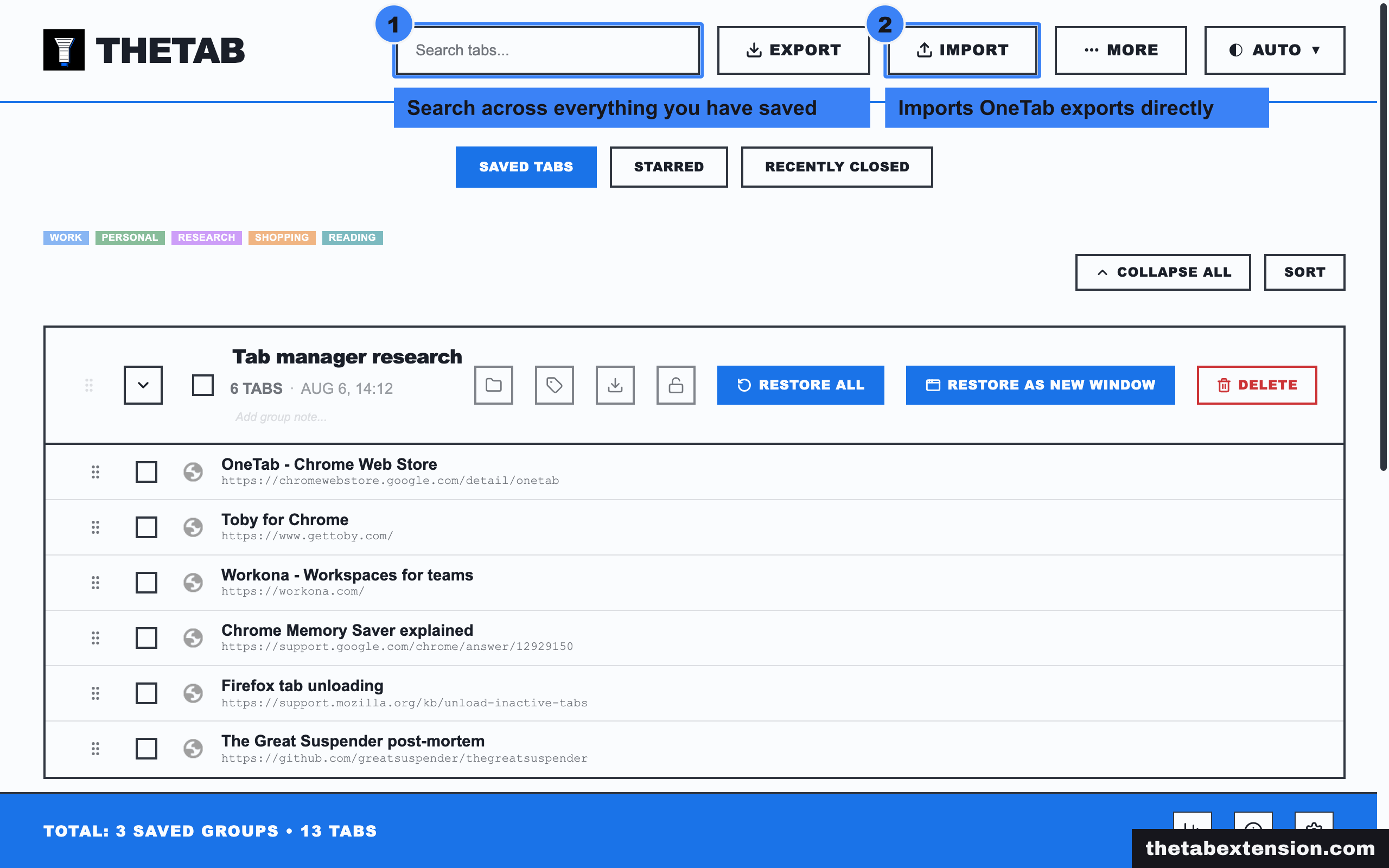
It is a deliberate restoration of the OneTab interaction model, with the parts that were missing added: search across everything you have saved, automatic organisation by date so the archive stays navigable, automatic backups plus export and import in formats you can reuse, and keyboard shortcuts. The archive stays in local browser storage. There is no TheTab account and no TheTab server. Two backups are on by default and both can be switched off: recent groups are mirrored into your browser's own sync storage, and a bookmarks folder tracks your saved groups, so a reinstall or a second machine can recover recent work. That is a safety net, not a sync product. Only recent groups fit the quota, the full archive still moves by export and import, and nothing there is ours to see. If cross-device access is your main requirement, Toby is the better fit and you should use Toby.
What TheTab is for is the person who wanted the original one-button OneTab kept small, searchable and backed up. It is free, with no paid tier holding anything back, and it imports OneTab exports directly.
How do you decide between them?
The question that settles it: do you reopen the same set of tabs on a schedule? If yes, you want collections, and Toby is the mature answer. If no, and you mostly want the pile to go away without losing anything, you want the list model, and the choice is between OneTab as it is now and something that kept the older, smaller shape.
The full field, including Session Buddy, Workona and Tab Session Manager, is covered in the OneTab alternatives roundup, and if you are still working out what these tools even are, start with what a tab manager does and which category you need.
Whichever you choose, do the export at least once, open the file, and confirm your tabs are in it.
SOURCES
Every factual claim in this article traces to a source below. Where we could not source a claim, we removed it rather than softening it.
The release notes for OneTab 2.13, released 4 March 2026, list search across saved tabs alongside folders, tasks, a quick list and a new action popup, and state that restored tabs can be opened in an unloaded state so they do not consume memory until needed.
OneTab's help page heads its sync and backup section "Coming soon" rather than describing a shipped feature, warns that uninstalling OneTab causes the browser to delete stored tabs, and describes a search bar on the OneTab page itself.
OneTab's privacy policy states that information about your tabs is never transmitted or disclosed to either the OneTab developers or any other party, and that tabs are never shared unless you specifically use the share as a web page button.
OneTab's Chrome Web Store listing shows no in-app purchases badge and carries no pricing, subscription or offer information of any kind.
Toby's pricing page marks "Share collection" as available on all three plans including the free Starter tier, caps Starter at 60 saved tabs, and shows priority support and SSO as the only Team-exclusive rows, with AI, advanced history search and duplicate removal held on the paid plans.
Toby's privacy policy states that if you sign up for a Toby account it stores the tabs and lists you add as part of its service, and that all customer data stored on its servers is eradicated after a customer deletes their account.