
An extension roundup is only worth reading if someone checked the listings. The previous version of this article got two entries wrong about which browsers they run on, and one of those - uBlock Origin - was wrong in the way that matters most, because it has not been installable on Chrome since 2024.
Every extension below was checked against its live store listing in August 2026, with the version and update date noted where it tells you something. The earlier claim that these had been tested for performance impact has been removed, because no such test happened.
Which ad blocker actually works on Chrome in 2026?
uBlock Origin Lite, not uBlock Origin. The full uBlock Origin cannot run on Chrome and has not been available there since Google removed it from the Chrome Web Store in late 2024. Any 2026 list that tells you to install uBlock Origin on Chrome has not been checked.
The cause is Manifest V3. The full uBlock Origin relied on the blocking webRequest API to inspect and cancel network requests as they happened. MV3 replaces that with declarativeNetRequest, where the extension registers rules up front and the browser enforces them - which imposes a hard ceiling on the number of filter rules and removes the dynamic filtering the extension was built around. Per Google's own deprecation timeline, MV2 extensions are disabled for all users as of Chrome 138 and cease functioning entirely from Chrome 139. Edge began retiring MV2 in August 2026.
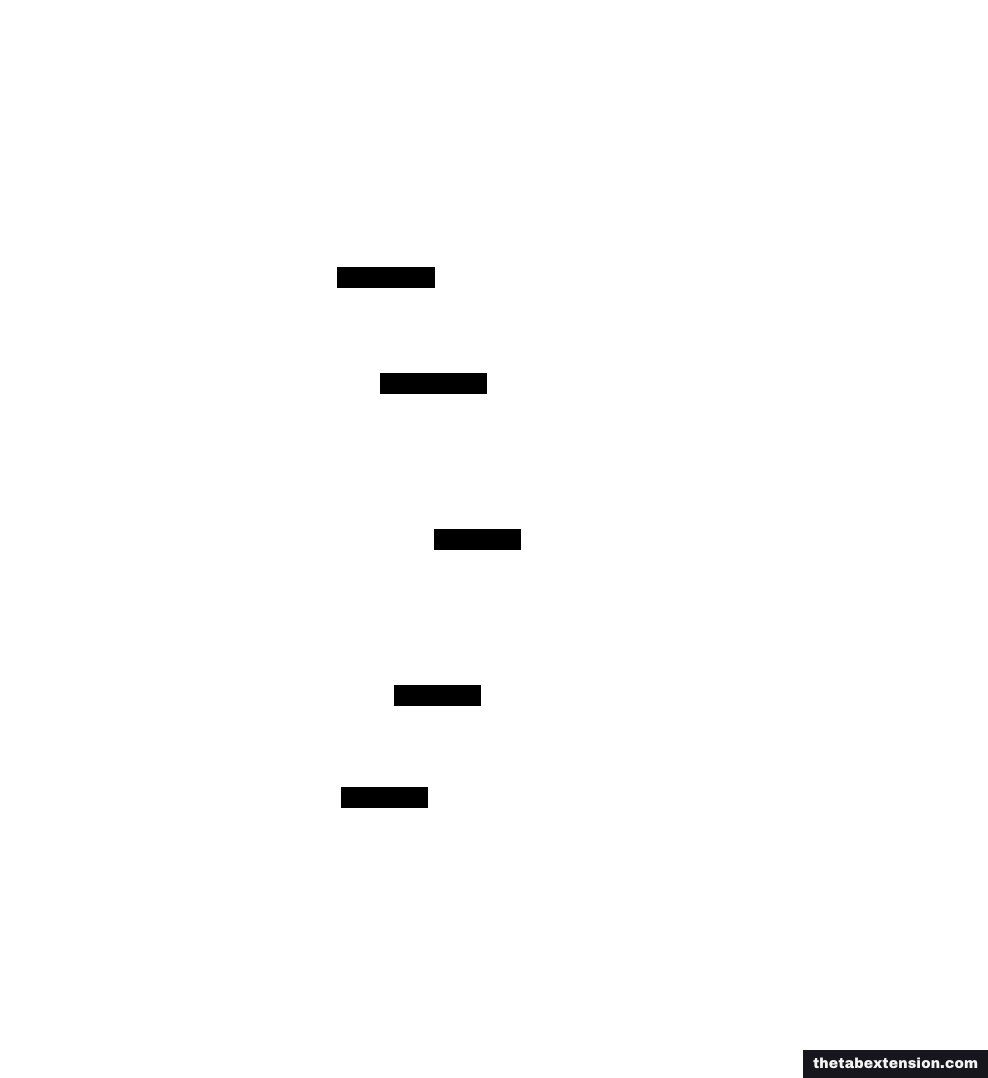
uBlock Origin Lite is Raymond Hill's own MV3 rewrite, at 16 million users and updated 12 August 2026. It is a good blocker and it is not the same product. By uBlock Origin's own account the Lite version cannot load all filter lists simultaneously because of the rule limits, does no cosmetic filtering in its default mode, and has limited dynamic filtering.
Full uBlock Origin still works in four browsers. Firefox is the obvious one, because Gecko kept the blocking webRequest API that the extension depends on. uBlock Origin's own site lists Edge and Opera as currently supporting the full extension too. The one people miss is Brave, which hosts four Manifest V2 extensions on its own servers: AdGuard, NoScript, uBlock Origin and uMatrix. You install those from brave://settings/extensions/v2, not from the Chrome Web Store, and they are separate builds from the ones distributed elsewhere.
Edge is the browser where the two sources here disagree, and it is worth knowing which one to weight. uBlock Origin's page lists Edge as currently supported and adds that it may follow Chrome's deprecation, while BetaNews reported that Edge had already begun retiring Manifest V2 in August 2026 and expected to finish by the end of the year. The primary source is the more cautious of the two, so the honest reading is that Edge works today and nobody involved expects that to hold for long.
Is the blocker worth the install regardless of which version you get? The earlier version of this article claimed uBlock Origin "cuts page load times by 30 to 50%", which was unsourced. Here is a real number instead. DebugBear's study of 5,000 Chrome extensions, published May 2024 and updated December 2025, loaded two ad-heavy news pages and found 57 seconds of CPU processing time with no blocker installed, dropping to just under 4 seconds with uBlock Origin. Page weight across the two sites went from 41 MB to under 3 MB. That is a big enough effect that it does not need rounding up.
One caveat on borrowing that number. DebugBear names the extension only as uBlock Origin and never says which build it installed. The study went out in May 2024, months before Google removed the full version from the Chrome Web Store, and its own conclusion treats the Lite version as a separate comparison still to come, so it almost certainly measured the full extension. On that reading, uBlock Origin Lite on Chrome will not match the figures, because it is doing less work by design.
Tab management
TheTab
TheTab is our own extension, so read this entry knowing that. It is on the list because it is the category this site is about, not because it beat anything in a comparison.
What it does is narrow on purpose: one click saves every open tab and closes them, the archive is searchable and organised by date, and it exports to a file you can read and re-import. It imports OneTab exports directly. The archive lives in local browser storage, there is no TheTab account, and there is no paid tier holding features back. It runs on Chrome, Edge and Firefox.
The limitation worth stating in the same breath: it is a safety net, not a sync product. Two backups are on by default and both can be switched off - recent groups are mirrored into your browser's own sync storage, and a bookmarks folder tracks them - so a reinstall does not wipe you out. Only recent groups fit the quota, though, and moving the whole archive still means exporting a file and carrying it across. If cross-device access is the actual problem you are trying to solve, Toby or Workona will solve it and TheTab will not. The earlier version of this article claimed TheTab uses "less than 5 MB of memory when idle"; that figure was never measured and has been removed.
For the full field, the OneTab alternatives roundup covers Session Buddy, Tab Session Manager, Toby and Workona alongside it, and what a tab manager actually is explains why picking from the wrong category is the usual reason people abandon these tools.
Tab Wrangler
Closes tabs you have not touched in a while and drops them into a searchable list called the Tab Corral, so nothing is actually lost. You can lock individual tabs or whole windows to exempt them, and maintain a domain exclude list. It solves the specific habit of opening things "for later" and never returning, which no amount of manual discipline seems to fix.
Both Chrome and Firefox have it, not Chrome-only as this article previously said. The Firefox listing was at version 8.3.0 as of 29 April 2026, and the repository is still active. It is licensed GPL-3.0, which the Firefox listing gets wrong: that page says MIT. A store listing is a metadata field somebody typed once, and this is the entry that proves checking the listing is not always enough.
Blocking distractions
LeechBlock NG
Blocks the sites you have decided you should not be on, on a schedule you set in advance rather than in the moment you are tempted. Up to 30 block sets, each with its own sites, days and times. Version 1.7.2 landed on 4 January 2026 and added a minimum block time, regular-expression keyword blocking and per-tab rules.
It runs on Firefox, Chrome, Edge and the other Chromium browsers. Free, no account, no upsell - which for a category full of subscription "focus" apps is worth saying out loud.
Reading and research
Raindrop.io
A bookmark manager that treats bookmarks as something you would revisit: collections that nest inside each other, tags, full-text search across the content of saved pages, and a visual grid where a folder tree would be. The Chrome listing shows 400,000 users and version 5.7.9 from 28 July 2026, and there are extensions for Edge, Firefox and Safari as well.
The trade-off is straightforward and you should make it deliberately: Raindrop is a hosted service. It requires an account and your saved links live on their servers. That is what buys you sync and search across devices, and it is the opposite trade from a local-only tool. If you want the local-only version of this decision, extensions that keep your data local works through it.
Reader View
Strips a page down to its text using Mozilla's open-source Readability implementation, which is the same engine behind Firefox's built-in reader mode. Firefox has this natively and does not need the extension. Chrome now has a full-page reading mode of its own, announced on 7 April 2026 alongside an option to show tabs vertically, so the extension is less essential on Chrome than it used to be - but the standalone Reader View (300,000 users, updated 11 May 2026) still gives you colour, font, width and text-to-speech controls that the native mode does not.
Writing
Grammarly
Real-time grammar and spelling checking in any text field in the browser. The free tier catches mistakes and shows you your writing tone. Grammarly's plans page marks adjusting that tone, rewriting full sentences and plagiarism detection as unavailable on Free; those are Pro. 36 million Chrome users, updated 12 August 2026. In late 2025 the parent company renamed itself Superhuman, an umbrella over Grammarly, Coda, Superhuman Mail and a new assistant called Superhuman Go. The writing tool is still called Grammarly.
Two things to know before installing it. It injects into every text field on every site, which is why it is the extension most often blamed for input lag - switch it off per-site and leave it on only where you write. And it sends what you type to Grammarly's servers to check it. Incogni's 2026 Privacy Risk Report, covered by Help Net Security on 28 January 2026, analysed 442 AI-powered Chrome extensions and ranked Grammarly and QuillBot highest for potential privacy impact - not because either showed signs of malicious use, but because of the combination of broad content access and an enormous installed base. That is a reasonable trade for a lot of people and a disqualifying one for anyone drafting under an NDA.
LanguageTool
This entry has changed and the change is the whole story. LanguageTool used to be the answer for people who wanted a Grammarly alternative that was free, open-source-rooted and strong on languages other than English. The browser extension is now Premium-only.
In March 2026 LanguageTool announced that the extension would require a paid plan, giving existing free users a 14-day Premium trial after which "LanguageTool's grammar checker and paraphraser will stop working for free users on the extension". The company's stated reason was that "a majority of users use our products for free, and the relatively small percentage of Premium subscribers is all that is subsidizing our continuously increasing server costs". LanguageTool's own recommendation to users who will not pay was to move to QuillBot, its sister brand.
The website checker at languagetool.org remains free. So does self-hosting the open-source engine, which is still the genuinely free option and always was, at the cost of running a service. If you were relying on the extension because it was free, this list can no longer send you there and pretend otherwise.
Passwords
Bitwarden
Open-source password manager, and the one place where the previous version of this article was wrong in a way that cost readers money. It claimed the free tier includes "two-device sync". Bitwarden's free tier has always included unlimited devices, along with unlimited stored items, the password generator and two-step login. The pricing page is explicit: a free account is a "fully functional password manager to store all your passwords across all your devices".
There is one Premium plan, $1.65 a month billed annually at $19.80, and it adds a built-in TOTP authenticator, encrypted file attachments, emergency access and vault health reports. None of that is sync. If you skipped Bitwarden because you thought the free tier capped you at two devices, it does not.
Keyboard and developer tools
Vimium
Vim-style keyboard navigation for the whole web: f labels every clickable element on the page so you can hit it by keystroke, j and k scroll, o searches bookmarks and history. The learning curve is roughly a week of feeling slower, after which reaching for the mouse to click a link starts to feel like a detour.
Chrome and Firefox both, plus any Chromium browser that installs from the Chrome Web Store. The Firefox listing is under the vimium-ff slug, at version 2.4.2 as of 7 March 2026, which is worth knowing because searching AMO for "Vimium" turns up several unrelated forks.
Refined GitHub
Around a hundred small changes to the GitHub interface: marking files as viewed in reviews, one-click branch deletion after merge, whitespace-aware diffs, better indicators throughout. No single one of them is worth installing an extension for. Together they remove most of the small friction from a day spent in pull requests.
Live on the Chrome Web Store at version 26.8.8 as of 8 August 2026 with 100,000 users, and also published for Firefox and Safari. Only runs on github.com, so it costs nothing anywhere else.
How many extensions should you actually run?
Three or four, in most cases. Not because of a memory budget - modern extensions are mostly idle - but because every extension is a piece of software with permissions over pages you visit, an update channel, and an owner who can change the terms. This article contains two examples of that last risk from a single year: a filtering API removed from underneath uBlock Origin, and LanguageTool putting its extension behind a paywall in March.
Before installing anything, two questions are enough.
Does this save more time than it costs? An extension that saves you five minutes a day and adds a second to every page load is a net loss, and the loss is invisible because it is spread thin.
Can the browser already do this? Reader mode, tab groups, vertical tabs, password storage and tab sleeping were all extension territory a few years ago and are now native nearly everywhere - the browser tab management comparison goes through what each browser ships in 2026. Installing an extension to duplicate a feature you already have is the most common way these lists cost people something.
SOURCES
Every factual claim in this article traces to a source below. Where we could not source a claim, we removed it rather than softening it.
uBlock Origin's own site lists full support on Firefox (recommended) and Brave, Lite only on Chrome and Chromium, and says Edge and Opera currently support the full extension, with a note that Edge may follow Chrome's deprecation. uBlock Origin Lite cannot use all filter lists at once, does no cosmetic filtering by default and has limited dynamic filtering.
uBlock Origin Lite is published by Raymond Hill, has 16 million users and was last updated 12 August 2026.
Brave hosts AdGuard, NoScript, uBlock Origin and uMatrix as Manifest V2 extensions on its own backend at brave://settings/extensions/v2.
Edge began retiring Manifest V2 extensions in August 2026 and expects to finish by the end of the year.
Across two ad-heavy news pages, CPU processing time fell from 57 seconds with no blocker to just under 4 seconds with uBlock Origin, and page weight from 41 MB to under 3 MB. The study names the extension only as uBlock Origin and never states which build was installed; its conclusion treats the Lite version as a separate comparison still to come.
The Bitwarden free tier stores unlimited passwords across all of a user's devices. One Premium plan is listed, at $1.65 a month billed annually at $19.80, adding an integrated authenticator, file attachments, emergency access and security reports. None of those is sync. Read 16 August 2026.
The Firefox listing shows Tab Wrangler at version 8.3.0, last updated 29 April 2026, and states an MIT licence, which the project's own repository contradicts.
The repository is licensed GPL-3.0 and links installs for both Chrome and Firefox. Its README describes the Tab Corral as a searchable list of every tab the extension has auto-closed, locking individual tabs and whole windows, and an exclude list that stops named sites from ever being closed. Read 16 August 2026.
The LanguageTool browser extension became Premium-only, with a 14-day trial after which the checker and paraphraser stop working for free users. The announcement page carries no publication date of its own. Read 16 August 2026.
The Grammarly listing shows 36 million Chrome users and a last update of 12 August 2026.
Grammarly's plans page marks writing without mistakes and seeing your writing tone as available on the Free plan, and marks adjusting your writing tone and rewriting full sentences as unavailable on Free. Read 16 August 2026.
Grammarly announced that the company, not the product, was changing its name to Superhuman, uniting Grammarly, Coda, Superhuman Mail and a new product called Superhuman Go under one brand, and that nothing changes about the products customers already rely on. The page is dated 5 November 2025.
Incogni's 2026 Privacy Risk Report analysed 442 AI-powered Chrome extensions and ranked Grammarly and QuillBot highest for potential privacy impact on breadth of access and installed base, not likelihood of malicious use.
Google's deprecation timeline states MV2 extensions are disabled for all users on all channels as of Chrome 138 and cease to function from Chrome 139.
LeechBlock NG runs on Firefox, Chrome, Edge and other Chromium browsers, with version 1.7.2 adding minimum block time and regex keyword blocking.
The Raindrop.io Chrome listing shows version 5.7.9, last updated 28 July 2026, with 400,000 users. Read 16 August 2026.
Raindrop.io states that it is available as a Chrome, Firefox, Safari and Edge extension, that tags classify items, and that the entire content of every saved web page, PDF and YouTube video is searchable. Read 16 August 2026.
Raindrop.io's own documentation states that collections support nesting, reordering and collapsing, and that dragging one collection onto another makes it a child. Read 16 August 2026.
Google announced on 7 April 2026 that Chrome's reading mode has a new full-page interface, alongside an option to show tabs vertically. The post names no Chrome version number.
Reader View has 300,000 users, was updated 11 May 2026, and adds colour, font, width and text-to-speech controls.
Vimium is published for Firefox under the vimium-ff slug, at version 2.4.2 last updated 7 March 2026.
Refined GitHub is live at version 26.8.8 as of 8 August 2026 with 100,000 users.